Help Center Release Notes
Solargraf Releases - June 3rd, 2025
Published on 3 Jun 2025
Added Features
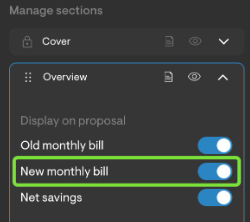
Toggle to hide "New Monthly Bill" in proposal overview
A toggle has been added to allow users to hide the "New monthly bill" section from the Overview section of the proposal.
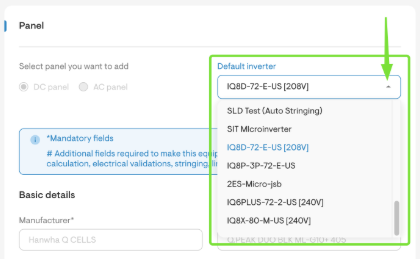
Pair favorited microinverters with favorited Panels
This new setting can be found through the Materials > My Materials > Panels section. Simply select the default inverter from the dropdown menu.
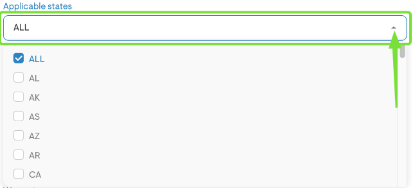
- Define Applicable States for panels and inverters
The ability to specify which state(s) a panel or inverter applies to can be found by navigating to Materials > My Materials > Panels and selecting Applicable states. This means it will only show in projects in the state set to.
Control who can edit User Roles & Permissions
A new section has been added to manage which users have the ability to edit other users' roles. For example, you can now determine whether a team leader has access to manage a salesperson’s roles and permissions.
Increased logo size on the cover page.
Increased logo size on the cover page to enhance brand visibility and improve overall presentation quality in proposals.TPO - Notification when pricing reaches max cap
A notification will now be displayed on the proposal when the PPW reaches the maximum allowable pricing.
Other features
Added a toggle to automatically zoom out the design after detecting the roof. This setting can be found under Company Settings > Design > Design Tool Default Settings. It was introduced to streamline the initial design process while allowing designers to account for a wider area, which is especially useful for evaluating shading factors.
Ability to download a PNG of system losses.
Implemented larger character limit & file size for document templates.
Adjustments to new proposal verbiage.
Improvements to the navigating between different pages of a PDF-based document template.