Help Center Release Notes
Solargraf Releases - August 23rd, 2026
Published on 24 Aug 2026
Financing
Sunstone Credit integration
You can now offer Sunstone Credit financing in Solargraf, including loan applications, payment estimates, savings comparisons, and webquote eligibility filtering. For setup instructions, seeSunstone Credit Integration on Solargraf.
Financing dashboard
A new financing dashboard lets you monitor lease and loan application activity, track performance by financing partner, and identify bottlenecks in your pipeline. For more information, see Financing Dashboard in Solargraf.
Pricing
Adders, discounts and incentive order
All percentage-based adders and discounts are now calculated before incentives are applied.
Adder for a specific panel or inverter
You can now create an adder that applies to a specific panel or inverter model, giving you more precise control over equipment-based pricing.
Proposal
Cashflow analysis table in advanced proposal customization
You can now add a cashflow analysis table to proposals using advanced customization mode. This gives customers a clearer year-by-year view of projected financial performance directly in the proposal document.
Learn more about advanced proposal customization.
Formula placeholders: date values supported
Formula placeholders in document templates now support date values (contract date, project created date, and document expiration date).
Projects
See how the proposal was signed
On the project overview page, you can now see whether the homeowner signed the proposal electronically or whether it was manually marked as signed. A message under system notifications shows who signed the proposal.
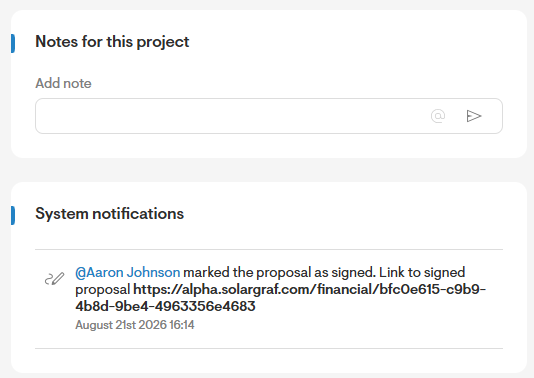
Permission to control who can mark proposals as signed
A new permission allows administrators to control who can manually mark proposals as signed. This adds more oversight to the signing workflow and helps prevent unauthorized status changes.
Editable default proposal option for PaaS customers
If you use PaaS, you can now edit the default proposal option at the project level.
Design tool
Sun path animation improvements
After the sun path animation finishes, the design view now returns to normal automatically.
Logical field ordering in menus
Fields in design tool menus are now ordered more logically.
Sol
Support for more inverter types
Sol now provides assistance for additional inverter types beyond microinverters.
Video sources for bot responses
When Sol provides an answer, it can now include video sources alongside article references.
Company settings
Improved layout and navigation
Financing partner settings are now consolidated on one page.
Site assessment configuration, custom financing options, terms and conditions templates, and tax and depreciation settings now have cleaner, more consistent layouts.
Roof design defaults and solar and battery defaults are now separate settings pages.