Help Center Release Notes
Solargraf Releases - January 22, 2026
Published on 21 Jan 2026
Design enhancements
Roof facet errors highlighted in the 3D model
When generating a 3D model, roof facets that cannot be rendered correctly due to inaccurate azimuths or walls are highlighted in red, making it easier to identify which elements need review.Roof summary retrieval via API
Roof summary data, including edges, facets, and obstructions, can now be retrieved via the public API.
Advanced proposal customization enhancements
Learn more about advanced proposal customizationhere.
Import images
Images can now be added to custom sections when advanced customization is enabled, using either uploaded images or Solargraf’s image library.Proposal preview in a separate window
Templates and proposals can now be previewed in a separate window. Selecting Preview from within the advanced custom section opens a full proposal preview, including the custom section currently being edited.
Financing enhancements
Current cash $/kW visibility on TPO pricing matrix
The latest cash $/kW values for design options, including solar pricing, battery pricing, adders, and discounts, are now visible on the TPO pricing matrix in the WebQuote.Pre-payment support for custom loans
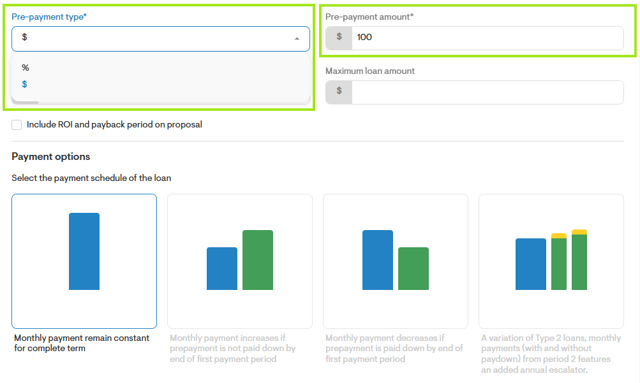
Custom loans now support pre-payment amounts, with a new Pre-payment field available in Company settings and Project settings that supports both percentage-based and fixed dollar amounts. Monthly payment calculations are reflected in the WebQuote.
Lightreach application status visibility
Credit application statuses received from Lightreach are now visible in Solargraf, including decline reasons and next steps when applicable.
Account management enhancements
Filter projects by document status
Filter projects based on whether documents are unsent, awaiting signature, or completed, making it easier to track the next steps.Project deletion permission
A new permission is available to control which users can delete projects. This can be enabled or disabled under Account settings > Roles & permissions.Option to hide roof shading by default
Users with access to Design settings can control whether the roof shading heatmap appears automatically when entering solar design. This setting is available under Account settings > Design > Default design settings.
Incentive enhancements
Display lifetime value of the recurring incentives in proposals
The lifetime value of all recurring incentives can now be displayed in the Cost section of the proposal, helping reduce the perceived net system cost.Recurring $/kW incentives (non-SREC)
Support has been added for incentives with a recurring $/kW value for annual grid service programs.
Permit and utility enhancements
Separate pre-solar and post-solar tariff selection for custom tariffs
Pre-solar and post-solar tariffs can now be selected separately in the custom tariff builder for non-Genability configurations.Wall elevation canvassing
Wall elevation views can now be adjusted within the design interface to support permit layouts.CEC 2025 support for California
SLDs and permit plan sets can now be generated in compliance with the CEC 2025 code adopted in the California market.Extended SLD and permit support for IQ Battery oversubscription
SLDs and permit plan sets can now be generated for Enphase IQ Battery oversubscription scenarios, including more than eight IQ 5P batteries or more than four IQ10C batteries.
Other updates
When designing systems with string inverters in the expert design experience, stringing is now required to ensure accurate production estimates.
Tree modeling now supports heights greater than 100 ft.
The pathways tool is now automatically deselected when pathways are detected, improving the design workflow.
System size values shown on proposals are now rounded to three decimal places.
The overview section now displays project lifetime based on the actual system configuration, rather than a default value.
Project “last updated” timestamps now reflect the most recent activity, including changes to design, proposals, pricing, utilities, financing, and customer information.
The Manage appliances button is no longer shown for commercial projects in Utility settings.
A short description has been added to the Site assessment section (previously Virtual site assessment) in Company settings.
System lease values are now displayed as monthly financing payments to align with proposal terminology.
Material management settings are now hidden for roles without permission to manage materials.
Multiple UI and UX improvements have been applied across proposals and advanced proposal customization.
Importing an extra cost or discount from settings now immediately adds and enables it in the project when selected via the import (plus) icon, without requiring additional editing or saving.