Help Center Incentives And Rebates
MACRs breakdown displayed within Pricing section
Published on 20 Apr 2023
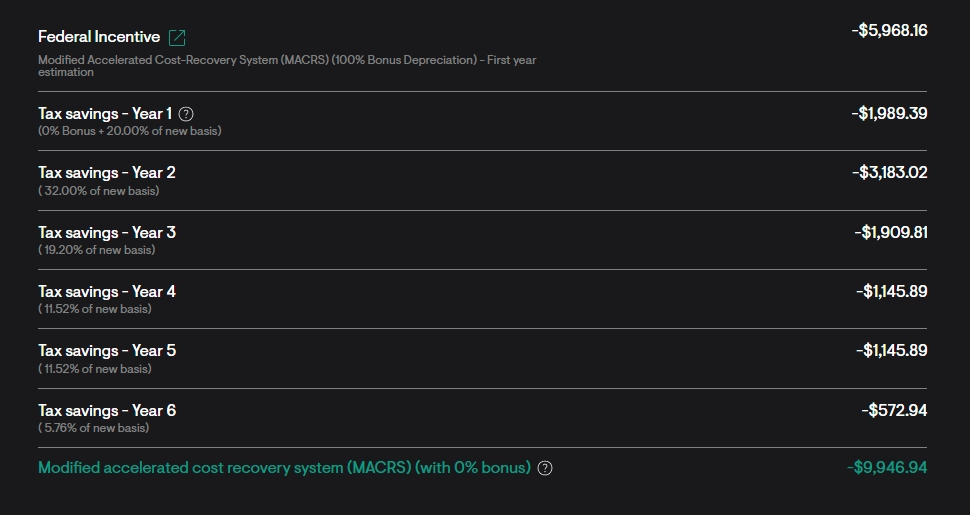
This guide will illustrate how the MACRs depreciation benefit calculations are illustrated within the proposals Pricing section. You can now view a breakdown of the annual MACRs payments in the Pricing section. The guide will also detail the calculations used to achieve the year-over-year tax savings and depreciation benefit as shown in the Pricing section.
Calculation of the MACRS Depreciation Schedule
- To calculate the MACRS incentive there are a few components that must first be calculated.
- The Blended Tax is calculated as follows:
- Blended Tax Rate = Federal Tax Rate + (1 - Federal Tax Rate)*State Tax Rate
- Example: Federal Tax = 18%, State Tax Rate = 0%, Blended Tax Rate = 18%
- The Depreciation Basis is calculated as follows:
- Depreciation Basis = Gross Cost - 0.5*ITC Amount
- Example: Gross Cost = $100,000, ITC Amount = $30,000, Depreciation Basis = $85,000
- The Bonus is calculated as follows:
- Bonus = Bonus % * Depreciation Basis
- Example: Bonus = 80%, Depreciation Basis = $85,000, Bonus = $68,000
- The New Basis is calculated as follows:
- New Basis = Depreciation Basis - Bonus
- Example: Depreciation Basis = $85,000, Bonus = $68,000, New Basis = $17,000
- The Annual Tax Savings are calculated as shown in the table below:
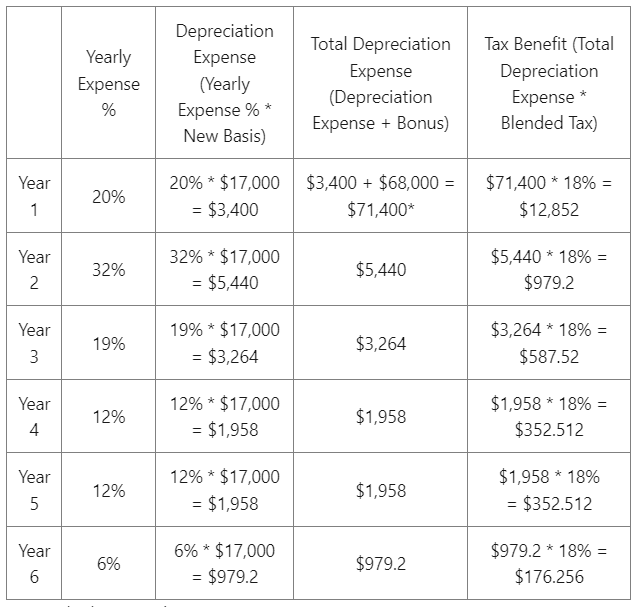
*Note: the bonus only occurs in Year 1.
Display of the MACRS Depreciation Schedule
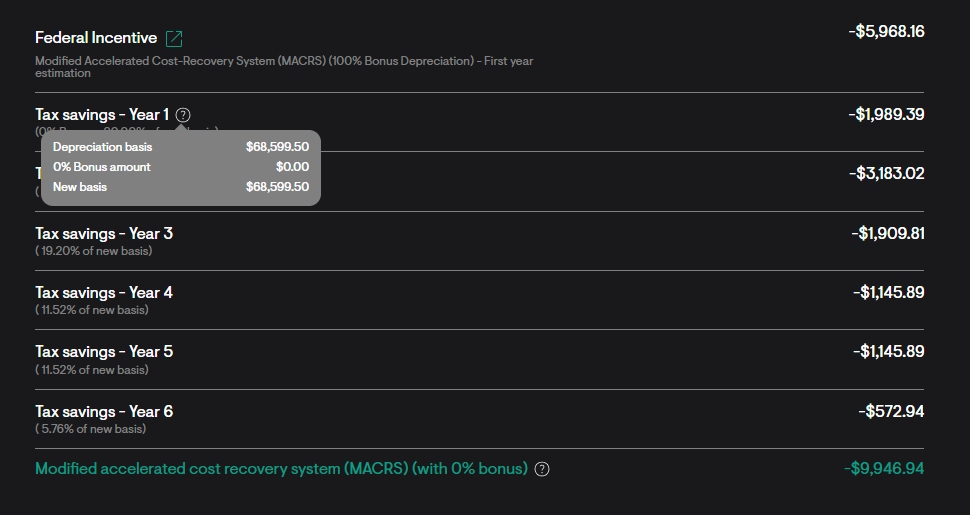
Note: A tool tip is now displayed next to the Year 1 subtext. You can hover your cursor over this icon to view the depreciation basis, bonus amount (calculated as % of the depreciation basis), and new basis.
- You will also be able to view the Yearly Tax Savings amount below the Pricing Section. Each line item displays the percentage in savings for that year.
- The Standard Depreciation percentages are as follows:
- Year 1 - 20% (+ any applicable bonuses)
- Year 2 - 32%
- Year 3 - 19.2%
- Year 4 - 11.52%
- Year 5 - 11.52%
- Year 6 - 5.76%