Help Center Appropriate FAQs
FAQ: Battery and BDT
Published on 10 Dec 2021
This article covers frequently asked questions about adding and modeling batteries in Solargraf's battery design tool.
What are the requirements for using a battery in the battery design tool (BDT)?
You must enter pricing details for the intended battery model under the Battery pricing section in the company's Settings page. Batteries that have not been priced will not be available to select from the BDT.
Which manufacturers are supported in the BDT?
Users can set up pricing for the following battery manufacturers:
- Alpha ESS Co.
- Amensolar ESS Co.
- Anker Solix
- AP storage
- Avalon
- battery evo
- Big Battery
- BYD Company
- Canadian Solar
- Discover Energy Systems
- Duracell
- DynessEG4
- Electriq Power
- EndurEnergy Systems
- Enphase Energy
- Epoch Batteries
- FNS Power
- Fortress Power
- Foxess Co.
- Franklin WH
- Generac
- GM Energy S.A.
- GoodWe Power Supply Technology Co.
- Greenworks
- Hanwha Q CELLS
- Home Grid
- Huawei Technologies Co.
- Kohler
- kstar
- LG Chem
- LG Energy Solution
- Lion Energy
- Lithium Vally
- Lunar Energy
- LV Topsun Solar
- Mango Power
- Maple Leaf Solar
- NEC
- NeoVolta
- NF Corporation
- Ningbo Deye Inverter Technology Co.
- Omron Corporation
- OutBack Power
- Panasonic
- PointGuard Energy
- PylonTech
- Pytes
- RCT Power
- Renogy
- Renon Power
- ROYPOW Technology Co.
- Runhood Power
- Savant Systems
- Schneider Electric
- Shenzhen Growatt New Energy Technology Co.
- Shenzhen SOFARSOLAR Co.
- Sigenergy
- SimpliPhi
- Sol-Ark
- SolarEdge Technologies
- SolaX Power
- Soluna
- sonnenBatterie
- Spitzer Energy
- Stored Power Technology
- Storz Power
- Sunfusion Energy System
- Sungrow Power Supply Co.
- SunVault
- Tesla
- Tigo
- UFO Battery
- Volt Bank
- Yotta Energy
- Zhuhai RUiXU Electronic Technology Co.
I don't see the battery I'm looking for listed in the pricing settings. How can I get it added?
To submit a request for Solargraf to model a new battery in the BDT and make it available for pricing, send an email to accounts@solargraf.com with the details of the requested battery.
Your request must also include the following attachments:
- A PDF of the manufacturer's spec sheet for the requested battery model
- A front-facing image of an installed battery
Will changing my battery pricing in the company settings impact my existing projects?
No, adjustments made to the Battery pricing settings at the company-level are not retroactive.
At the project-level, you must manually update the price in projects created prior to the change. Alternatively, you can delete and re-add the battery to reflect the updated pricing.
I've added a battery to a project with a net metering tariff, but there is little difference in the solar savings. Why is that?
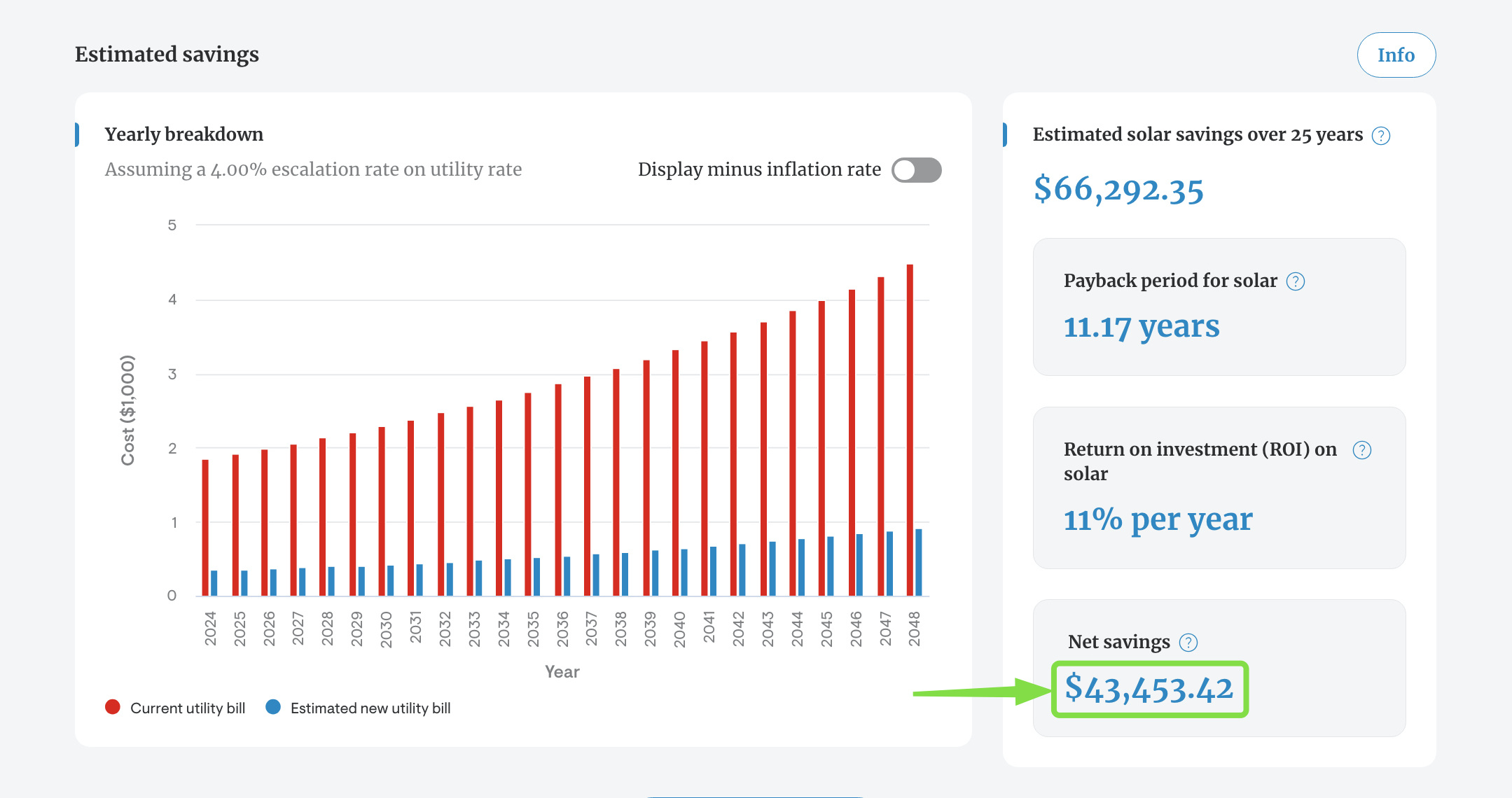
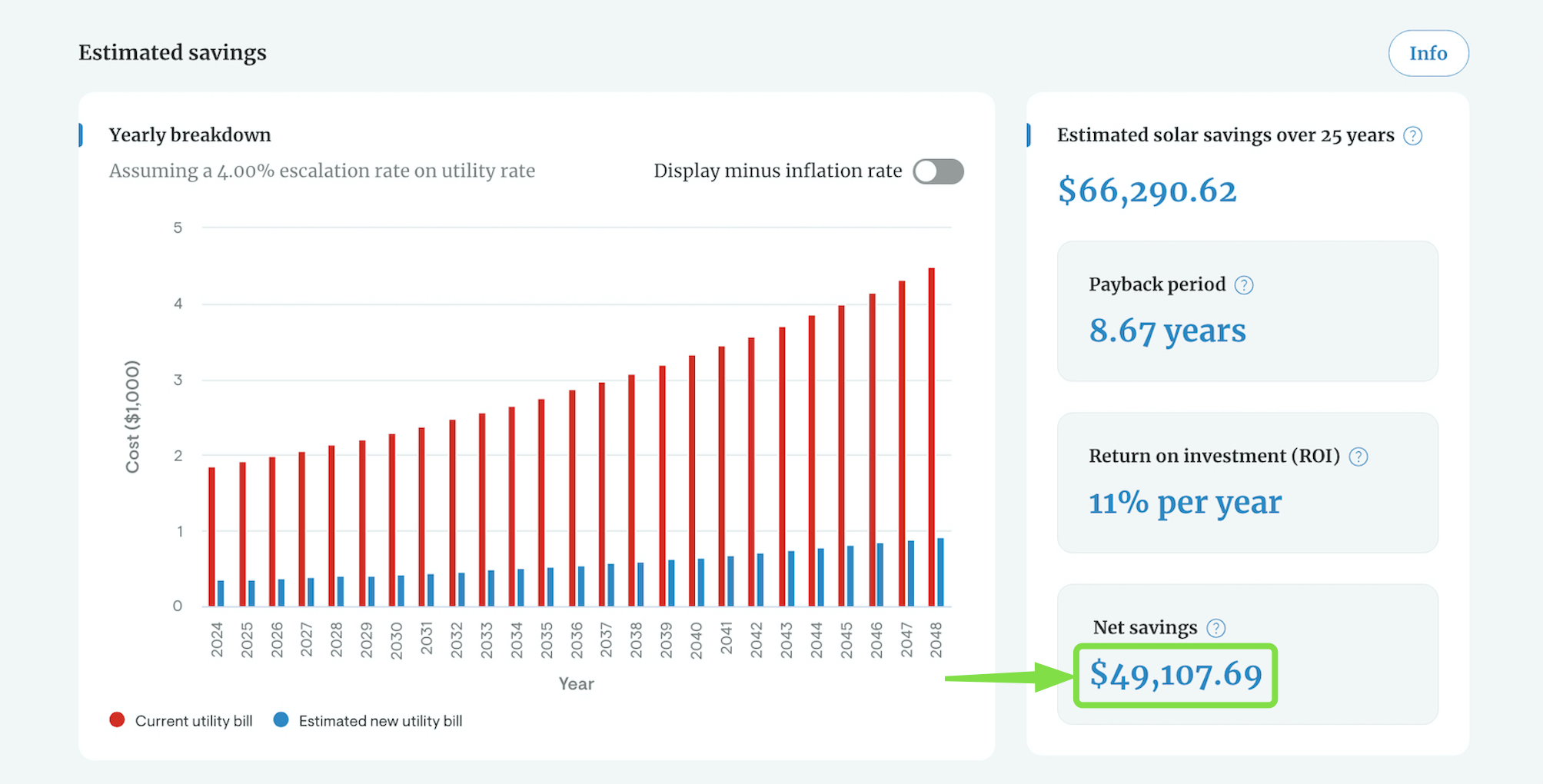
In this type of situation, the solar savings are similar for both a design with a battery and one without a battery because the battery's storage replaces net metering credits. When there is a battery, excess production is stored and used later. Without a battery, that excess production generates net metering credits, which in turn can offset usage outside of production hours.
However, the net solar savings may be different due to the battery cost.
Design with a battery:
Design without a battery:
How should I enter consumption for a battery add-on project?
When modeling a battery add-on in Solargraf, users should enter the total annual home consumption—not just the remaining grid usage.
Why it matters: Solargraf calculates the old bill based on net grid import/export, factoring in the impact of the existing solar system. The new bill includes the effects of both the battery and the existing solar. This ensures that savings, ROI, and payback calculations reflect the battery's contribution accurately.
Example:
If a home uses 10,000 kWh annually and the existing solar system produces 7,000 kWh, the grid import is 3,000 kWh.
- Estimated usage entry: Enter 10,000 kWh as total consumption.
- CSV upload option: Upload the 3,000 kWh grid import/export data and enter 7,000 kWh as solar production. Make sure to check the box labeled “Uploaded data corresponds to grid imports/exports” so Solargraf can combine the values correctly.
Entering only the grid usage (e.g., 3,000 kWh) without accounting for solar production will result in inaccurate modeling and misleading offset calculations.